XLSX are Just Text Files in a Trench Coat
It’s XML All the Way Down
A few years ago I was tasked to use an API with poor documentation that was only available in SOAP. Fortunately, there is a Python library called Zeep (docs.python-zeep.org/) – without it, I would have been completely lost. I grumbled through this task, feeling like I was working on something that if not already obsolete was well on its way. This is a good example of how everything can be a learning experience. Even if it wasn’t the thing you set out to learn.
This is how I learned that XLSX files are actually zipped XML files. And even though I had not not set out to learn that, taking it apart taught me something. So let’s take one apart:
1. Initial CSV File
Starting with a CSV file has about 1200 rows and 17 columns comes to 210 KB.
user/downloads/ └── data.csv (210 KB)
2. CSV Saved as .xlsx
Since the file is zipped, saving it as a .xlsx file reduces the file size to 141 KB.
user/downloads/ ├── data.csv (210 KB) └── data.xlsx (141 KB)
3. Formatted .xlsx File
Creating a formatted table and changing the fonts increases the size of the file to 768 KB.
user/downloads/ ├── data.csv (210 KB) └── data.xlsx (768 KB)
4. Now you can change the file extension to .zip and unzip the file to see the contents
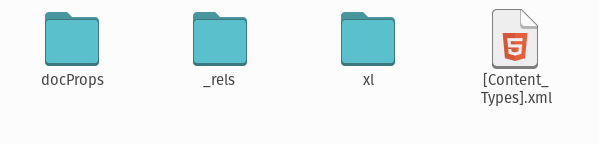
What we thought was a single file is actually a nested folder structure.
├── xl/ │ ├── _rels/ │ │ └── workbook.xml.rels │ ├── theme/ │ │ └── theme1.xml │ ├── worksheets/ │ │ └── sheet1.xml │ ├── styles.xml │ ├── workbook.xml │ └── sharedStrings.xml
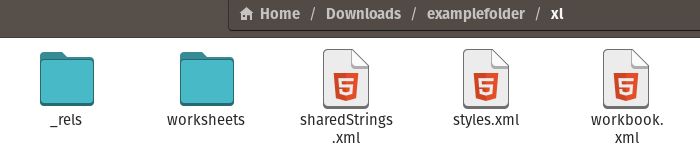
Now the weird changes in file size and why some (relatively) small XLSX files take so long to open almost makes sense. When I heard it was the Microsoft standard since 2007, I instantly assumed it was some nefarious plot to consolidate their market share. But actually, it opened up Excel from a proprietary to an open format called Office Open XML (OOXML). My bad Microsoft. I guess I should have read the ISO/IEC 29500:2008 standard before jumping to conclusions.
XML Forever?
XML (eXtensible Markup Language) was created in the late 1990s to replace SGML which I am guessing was a replacement for something else. JSON (JavaScript Object Notation) is a lighter weight alternative but obviously ther are still many applications where XML is the better choice. Or in the case of XLSX, the only choice.
Practical tips
- When sharing Excel data, consider providing it as a CSV file for simplicity and wider accessibility.
- Use Excel’s “Inspect Document” feature to see what XML data is embedded in your XLSX files.
- Explore using Python’s
openpyxlorpandaslibraries for advanced Excel file manipulations beyond the XML structure.
Recommended diagram — CRISPR mechanics
For a clear, well-labeled diagram that demonstrates CRISPR mechanics (target recognition, guide RNA, and nuclease cutting), see this figure from IJMS:
CRISPR mechanism diagram — IJMS Fig.1

This diagram is a useful reference when explaining how guide RNAs direct nucleases to specific DNA sequences.
Conclusion
Understanding the underlying XML structure of XLSX files can demystify many of the oddities encountered when working with Excel data. It also provides a powerful tool for data manipulation and analysis, opening up new possibilities for automation and integration with other data processing workflows.